Google has introduced a computer use feature for the Gemini API that lets developers build agents which observe screen content and perform actions inside a browser environment. The capability is delivered through a specialized endpoint and is aimed at tasks that involve navigating interfaces designed for human users, sitting alongside existing function calling and structured output tools.
What is computer use in the Gemini API?
The computer use feature allows agents to interpret rendered interfaces and decide how to interact with them, rather than only exchanging data through defined APIs. This complements existing function calling and structured output tools by adding a path for tasks that lack a clean programmatic interface.
How does the model interact with a browser?
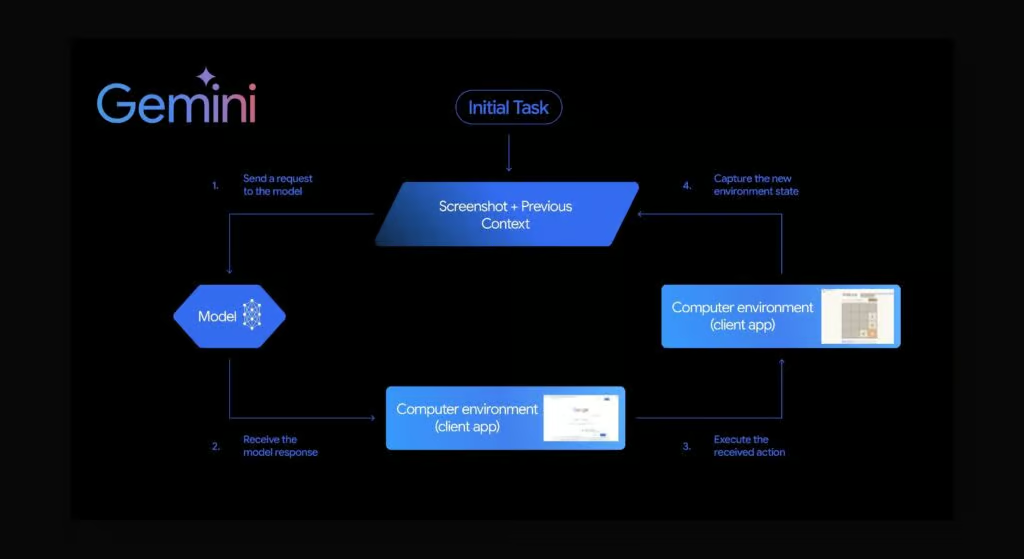
The flow is built around a loop between the model, the developer code, and a browser. The developer provides a screenshot of the current page along with the user’s request. The model returns a function call describing the next action, such as a click, type, or scroll, with coordinates and a target element when possible. The developer code executes that action in the browser, captures a new screenshot, and sends it back to the model. The cycle continues until the task is complete or a stopping condition is reached.
Each interaction is structured around a defined set of UI actions and an expressive response format, which makes it possible to log decisions, evaluate agent behavior, and build safety checks into the application layer.
Which model supports computer use, and what are the prerequisites?
The capability is offered on a specific Gemini model rather than the full model family. Developers need to enable the feature in their project, use a recent version of the Google GenAI SDK, and ensure their workspace has access to the relevant model before sending requests.
Configuration steps
- Confirm your Google Cloud or AI Studio project has access to the computer use model.
- Install or update the Google GenAI SDK to a version that supports the new endpoint.
- Set environment variables for API keys and any required authentication.
- Choose an integration pattern that fits your agent runtime, either a simple request-response loop or a managed orchestration layer.
How should prompts and context be designed?
Computer use relies on a system prompt that defines the agent’s role, the available UI actions, and any constraints. Developers are encouraged to write prompts that describe the environment clearly and include expectations around confirmation steps, navigation limits, and error handling. When sensitive actions are possible, the prompt and application code can require explicit user confirmation before execution.
Providing context such as the current URL, recent actions, and any relevant reference text helps the model decide what to do next. Returning additional information with each screenshot, such as task progress, can also improve reliability.
What does an example interaction loop look like?
A typical implementation includes three components: a function that collects a screenshot and sends a request to the model, a function that receives a recommended action and performs it in the browser, and a function that determines when the task is finished. The model can respond with a structured action object, a final response when the task is complete, or a request for more information when the prompt is ambiguous.
Developers can test these loops using browser automation tools such as Playwright, then extend them to more complex flows once the basics behave predictably.
What safety and operational considerations apply?
Because computer use agents act on rendered interfaces, the same risks that apply to browser automation apply here as well. Pages can change structure without notice, sensitive data may appear in screenshots, and irreversible actions may be possible from the UI. Recommended mitigations include restricting the set of allowed domains, requiring explicit user approval for high-risk actions, validating that a planned click targets an expected element, and scrubbing captured screenshots of personal data before they are stored or logged.
Reliability also depends on how the agent handles popups, login screens, captchas, and unexpected navigation. Building recovery flows for these cases is part of preparing a computer use agent for real users.
Which use cases are worth exploring?
Computer use is a good fit for workflows where the only available interface is a browser, where an API does not exist, or where legacy systems cannot be integrated through traditional means. Examples include filling forms across multiple web portals, gathering information from internal dashboards, and assisting users with repetitive navigation tasks.
For tasks with clean APIs or well-defined structured data, function calling remains the simpler and more deterministic option. Computer use is best reserved for situations where the visual interface is the only practical path.
FAQ
What is the Gemini API computer use feature?
It is a capability in the Gemini API that lets developers build agents which observe screen content and perform actions inside a browser environment, accessed through a specialized endpoint and used alongside function calling and structured output tools.
Which Gemini model supports computer use?
Computer use is offered on a specific Gemini model rather than the full model family, and developers must enable the feature in their project, use a recent version of the Google GenAI SDK, and confirm workspace access before sending requests.
How does the computer use interaction loop work?
The developer sends a screenshot and the user’s request to the model, receives a function call describing the next action with coordinates and a target element, executes that action in the browser, captures a new screenshot, and repeats the cycle until the task is complete or a stopping condition is reached.
Run a free scan to see your AI Visibility Score, SEO rating, and local citation accuracy.